7 Bilingual Website Mistakes That Hurt Readers and SEO
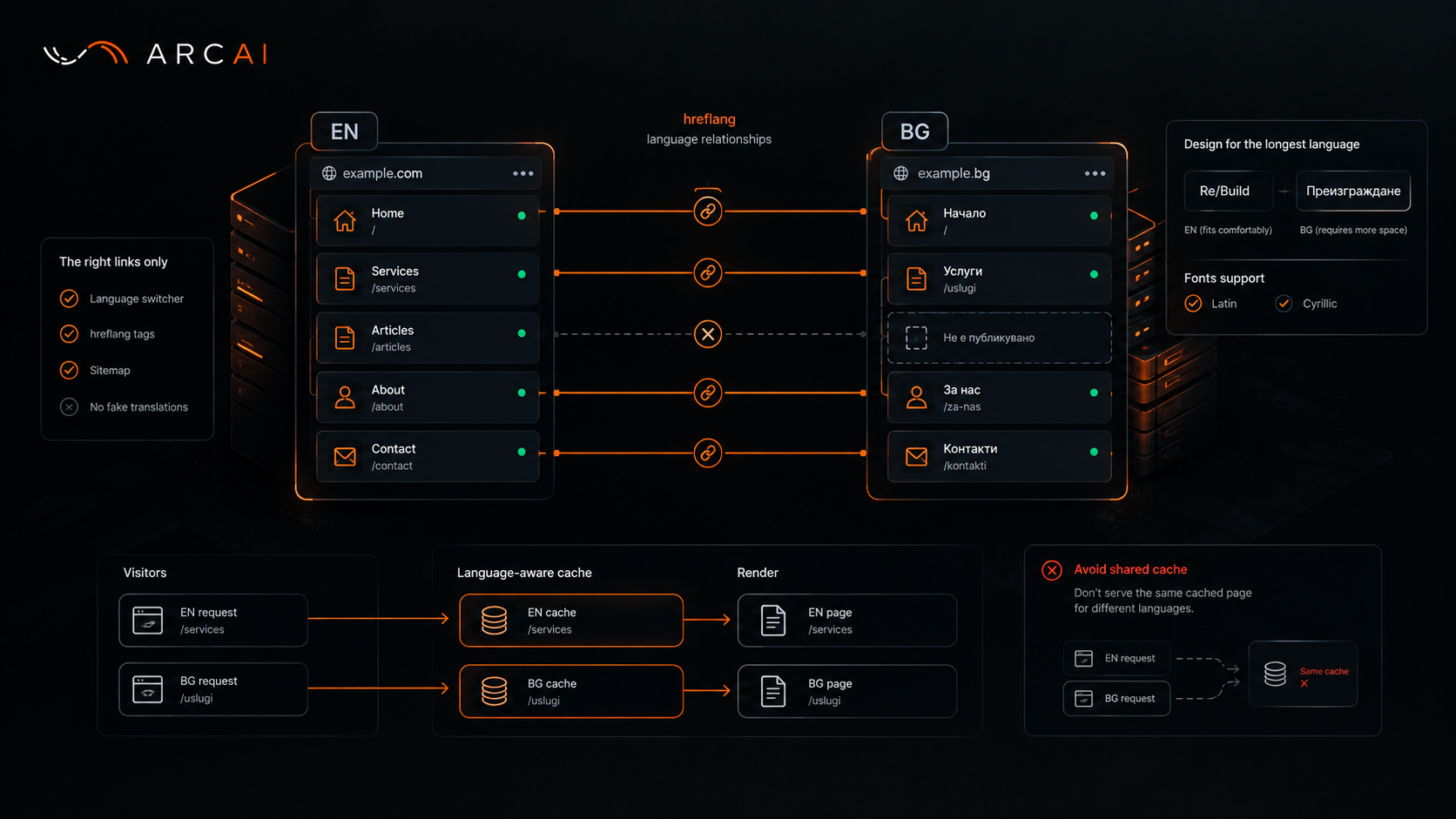
One Rule Decided Everything Else
Arc AI built its site in English and Bulgarian in three days, and the obvious shortcut came up fast: show English text when the Bulgarian page isn't ready, so nothing looks empty. The team ruled it out before writing a line of that fallback. A missing translation means the page doesn't exist in that language. That decision then exposed problems the English-only version had never shown: overflowing text, a font missing an entire alphabet, a caching shortcut that would have served the wrong language.
A Missing Page Should Say So
Showing English text under a Bulgarian address looks like a kindness. To a reader it reads as a broken translation. To a search engine it looks worse: a hreflang tag pointing at a Bulgarian page with no Bulgarian in it.
So the rule is blunt. The language switcher and hreflang tags only link pairs that genuinely exist on both sides. No Bulgarian version? The address returns "not found", never a redirect to the English article. The sitemap lists real language pairs only, with English as the default.
Treat Each Language As Its Own Publication
Publishing the English version doesn't publish the Bulgarian one. Each language needs its own address, summary, SEO fields, status and date. An admin screen shouldn't ask "does anything look unfinished?", it should ask "is the Bulgarian version specifically a draft?"
One exception: client quotes keep their original English wording even in the Bulgarian version, because rewriting a testimonial isn't translating it. Where no Bulgarian text exists at all, the fallback is a written Bulgarian default, never the English original.
Design for the Language That Runs Longest
On the services page, a card sized for the English label "Re/Build" met its Bulgarian equivalent, "Преизграждане", and the word overflowed entirely.
Bulgarian text runs longer than English, often by a wide margin. The fix was sizing text relative to its own container, not a font size chosen for English and hoped to survive translation. Every component now gets tested in its longest language, on a phone.
Fonts cause a quieter version of the same problem: the site's heading font has no Cyrillic characters, so Bulgarian headings fall back to the body font, a deliberate decision rather than an accident.
Bugs That Only Show Up in the Second Language
A caching trick that works fine on a single-language site turns dangerous with a second one. Arc AI's plan review flagged a template optimisation that would render a shared component once, at build time, then serve that same cached version to every visitor regardless of language. Anything that depends on the request, language included, has to stay outside that kind of caching.
Smaller leaks matter too: form validation messages default to English in most frameworks, error pages need to detect language from the address itself, and one automated test comparing both translation files catches a missing label before it reaches a live page.
Six Questions Before You Call a Site Bilingual
- Does every switcher link lead to a page that actually exists in that language?
- Do hreflang tags list only real pairs?
- Is every language published, dated and summarised separately?
- Have you tested every component in its longest language, on a phone?
- Does your font include every alphabet you publish in?
- Is anything cached in a way that ignores the visitor's language?
Two Languages, One Standard
A bilingual site isn't two sites glued together with a switcher, it's one site that happens to speak twice. Every shortcut that treats the second language as an afterthought eventually shows up: a broken card, a missing label, a page search engines stop trusting. None of these fixes were expensive; each just had to be decided on purpose, before launch.