SQLite in Production: When It's the Right Call and How to Run It Safely
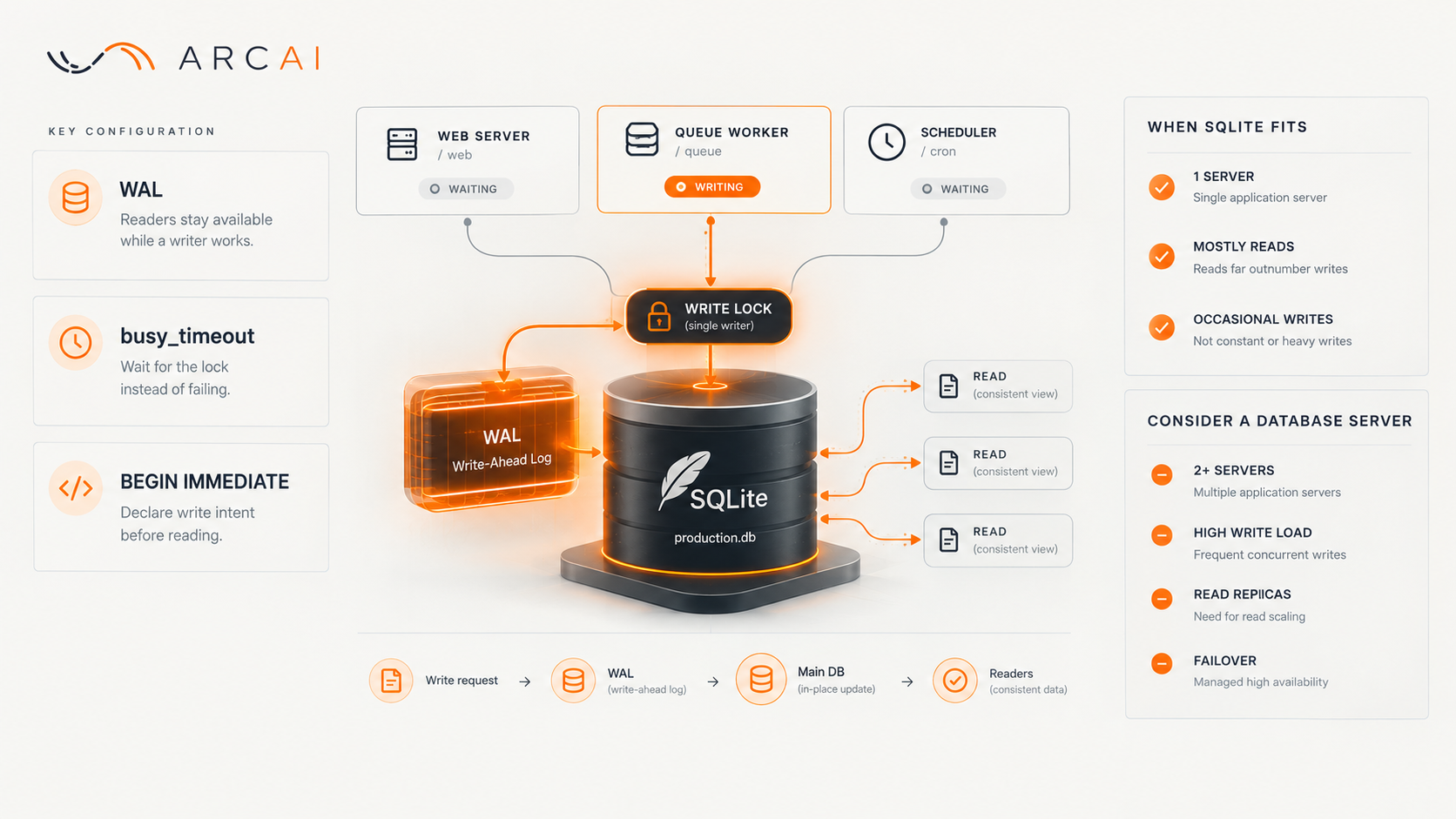
One File, Three Writers, No Server to Babysit
Three separate processes write to the same database file on Arc AI's own site: the web server, a background queue worker, and a scheduler. Reads happen constantly, writes a few times an hour. No database server, just a file on disk. This covers what makes that file safe with more than one writer, and where it stops being the right tool.
When SQLite Fits, and the Lock You'll Eventually Hit
SQLite suits one server, a mostly-read workload, occasional rather than constant writes, and a preference for simple backups over infrastructure with its own credentials and start-up order. It stops fitting with a second application server, since SQLite's file lives on one machine, or once writes turn frequent and concurrent, or once you need read replicas or managed failover.
One bonus: the site's roughly 670 PHP tests run against an in-memory SQLite database, no containers, no schema seeded over a network.
Give a single-file database three processes that all want to write, though, and you'll eventually hit "database is locked". SQLite allows only one writer at a time; a second writer arriving mid-transaction fails immediately rather than waiting. With a web request, a queue worker and a scheduler touching the same tables, that's a matter of when, not if.
The Three Settings That Make Concurrent Writes Safe
WAL mode (write-ahead logging) sends new writes into a separate log file first, folded into the main database later, so readers keep a consistent view while a writer works. That removes most contention.
A busy timeout, five seconds here, lets a writer that finds the file locked wait for the lock to clear instead of failing on the spot.
The setting most people miss: a transaction that starts by reading and only later decides to write can still fail instantly, even with WAL and a timeout on, because SQLite won't wait for a write lock mid-transaction, that's a deadlock risk. The fix is telling SQLite upfront that a transaction intends to write, so it takes the write lock immediately and queues properly. Arc AI's plan review caught this before the site saw real traffic.
Two Tables, One Address, One Write Path
Unique indexes still let two tables collide. Picture posts and categories, each handing out addresses from the same namespace with its own unique index. Neither index knows about the other table, so two processes can each find an address free in their own table and commit at nearly the same moment, two rows in two tables sharing one address, both indexes satisfied.
No single-table index can catch that. The fix is routing every write that assigns one of these addresses through a single transaction that checks both tables before committing either. Busy? The user sees "try again", never a URL shared by two things at once.
What a Table Rebuild Can Quietly Undo
SQLite can't apply every schema change directly; many require building a new table, copying every row, dropping the old one and renaming the new one in. That only preserves what the migration explicitly recreates. One migration rebuilt a table for an unrelated reason, left out a CHECK constraint ("status must be draft or published"), and the rule silently stopped existing. It was restored and written into the table definition itself, so the next rebuild keeps it automatically.
Backups have a similar trap. In WAL mode, recent commits can sit in the separate log file rather than the main file, so copying just the main file live can miss the last few minutes of writes. SQLite's own online backup mechanism copies both files consistently; a plain file copy doesn't. Opening the live file through a Docker file share while the container's running can also show stale data, since WAL relies on shared memory that doesn't cross that boundary cleanly.
Before You Trust It in Production
- One server, mostly-read workload? SQLite is a genuine option.
- WAL mode on, busy timeout set, write transactions marked immediate from the start.
- Anything unique across more than one table goes through a single write path.
- After any table-rebuilding migration, confirm old constraints still reject bad values.
- Back up using SQLite's own online mechanism, and test restoring from it.
- Write down what would mean it's time to move off SQLite.
Weighing SQLite Against a Database Server
Running MySQL instead would mean another container, hundreds of megabytes of memory it doesn't need, separate credentials, start-up ordering, and a second backup routine, without buying a single feature the site needs. The honest signals to reconsider: a second application server, lock waits in the logs, or a genuine need for replicas or failover. None apply yet.