It Worked in the Container: 5 Traps That Only Show Up in Production
The Server Had Nothing on It but Docker
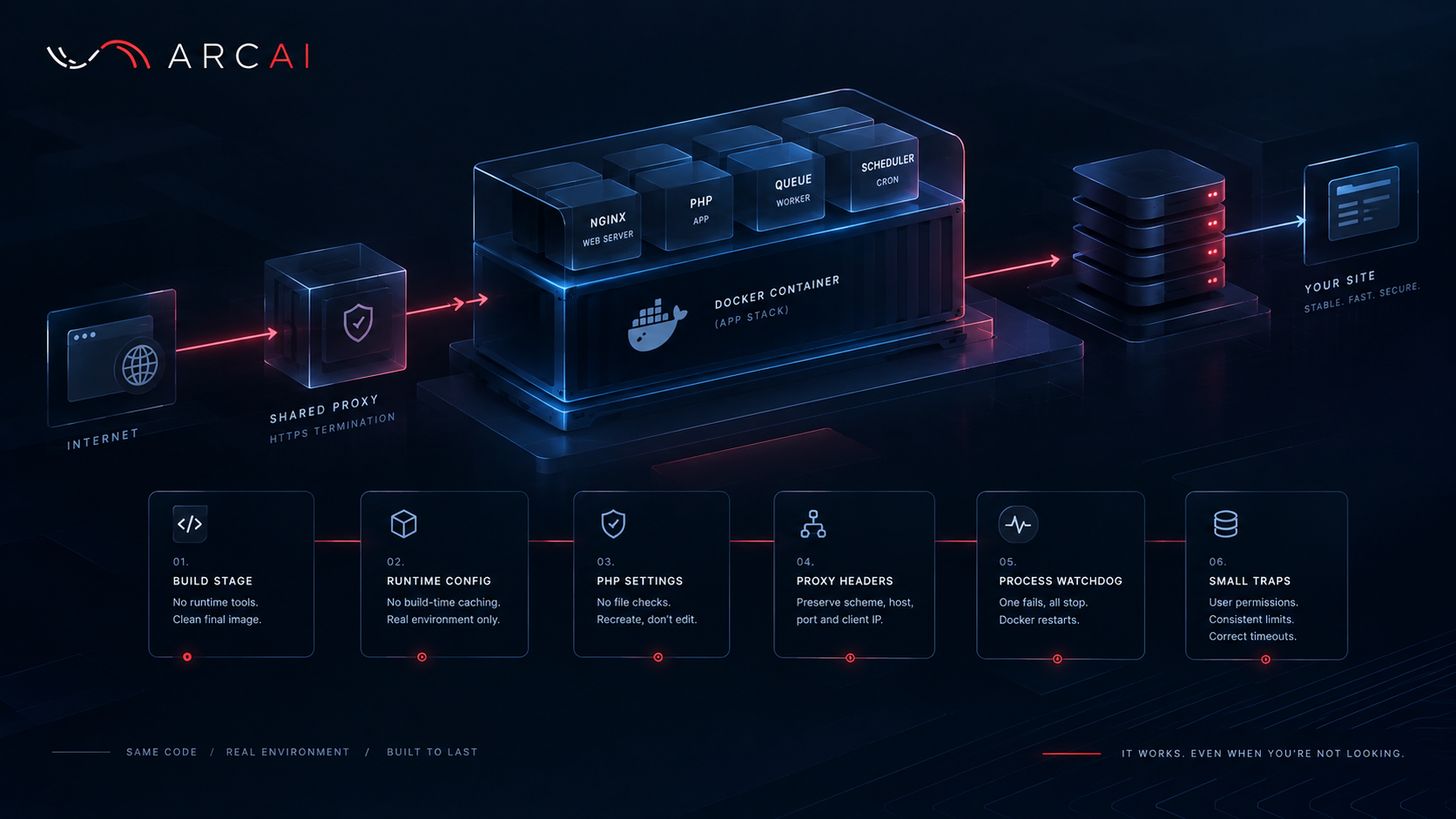
When Arc AI moved its site onto a containerized production host, the brief was simple: nothing installed on the host beyond Docker. A shared reverse proxy handles HTTPS and passes traffic to the application container. That meant the image had to build itself, warm its own caches and recover from a crash with no help from the host. None of the five traps below show up on a local machine.
Build Tools That Don't Belong in the Final Image
Frontend assets get compiled in throwaway build stages; only the finished files reach the image the server actually runs. Arc AI's final image comes to about 214 MB and needs nothing beyond Docker to start.
The trap sits in the CSS step: the build keeps only the classes it finds by scanning specified template folders. Leave one folder off the list and the stylesheet quietly loses whatever classes only appear there, a button loses its colour, a card loses its padding, and every automated test still passes because the page still renders, just wrong.
The fix is a test that checks the scanned-folder list against the folders that actually exist, plus a look at the built production image itself before shipping.
Caching at Build Time Bakes In the Wrong Environment
Some Laravel values, routes, configuration and service bindings depend on secrets and paths that only exist once the container starts. Cache those during the build and the image freezes in a version of reality that was never true anywhere.
The rules here are pinned by tests: no caching at build time, a fixed start-up order, a local-only port for anything that shouldn't be reachable externally, one storage mount rather than several. Caches only warm once the container is running with real configuration loaded.
PHP Told to Stop Rechecking Files
Inside a fixed image, code never changes after build, so PHP is told to stop checking files on every request, a genuine speed win. The cost: a config edit inside an already-running container is invisible until PHP restarts.
The habit: every config change goes through recreating the container, never editing it in place, written down in the deployment document rather than assumed.
The Endless Redirect
Locally everything speaks plain HTTP, so this trap doesn't exist on a local machine. In production, a reverse proxy can terminate HTTPS for visitors while forwarding the request to the application over an internal connection. If the application isn't told which scheme the visitor originally used, it can see HTTP and redirect to HTTPS; the proxy terminates HTTPS again and forwards the request once more. The result is an endless redirect loop until a visitor sees "too many redirects."
The fix: the proxy must preserve the original scheme, host, port and visitor address, and the application must trust those forwarded values only from its configured proxy layer. Those same headers also tell the application which address a visitor is really connecting from; get that relationship wrong and every request can appear to come from the proxy, quietly breaking anything that rate-limits visitors.
The important part isn't the particular proxy configuration. It's making the trust boundary explicit: the application should know which proxy is allowed to supply forwarded request information, and nothing else should be trusted by default.
A Container Can Be Running and Still Dead Inside
Docker only knows whether a container's top-level process is alive. Arc AI's container runs several application processes under one supervisor: web server, PHP, queue worker and scheduler. If one dies and doesn't come back, the supervisor can carry on regardless, and Docker keeps reporting the container as running while, say, the queue never processes another job.
The fix: a small listener watches all the required processes and stops the whole container the moment any one fails for good, handing the job to Docker's restart policy. The team tested this on purpose, killing a process deliberately to confirm recovery worked.
The Small Traps Worth a Line Each
A one-off command run as root creates a log file owned by root, and the app can't write to its own logs until the next rollover. Run one-off commands as the app's own user, never root.
Upload size limits exist at multiple layers, and all of them have to agree. A limit at the application layer is useless if the proxy rejects the request first; a generous proxy limit doesn't help if the application refuses the upload afterwards.
Job timeouts, locks and retry windows need strict ordering too. A job's lock must remain valid for at least as long as the job can legitimately run, while the retry window must account for the lock and the time required for another attempt. Otherwise a slow job can still be running when its lock expires and get processed twice.
A Checklist Worth Running Before You Deploy
- Does anything get cached while the image is being built?
- How does a config change reach PHP processes already running?
- Does your proxy correctly preserve the original scheme, host, port and visitor address?
- Does the application trust forwarded headers only from the proxy it actually expects?
- What happens the moment one program inside the container dies for good?
- Do one-off commands run as the app's own user, not root?
- Are upload limits and timeouts consistent across every layer?
- Can a slow job outlive its lock and be processed twice?
Built Once, Meant to Stay Standing
None of this is exotic. It's the gap between a container that starts and one that survives months alone on a real server behind a real proxy. Most of these traps get caught on paper or by a test, a far better place than a live site with real visitors on it.